Analyzing the query output
|
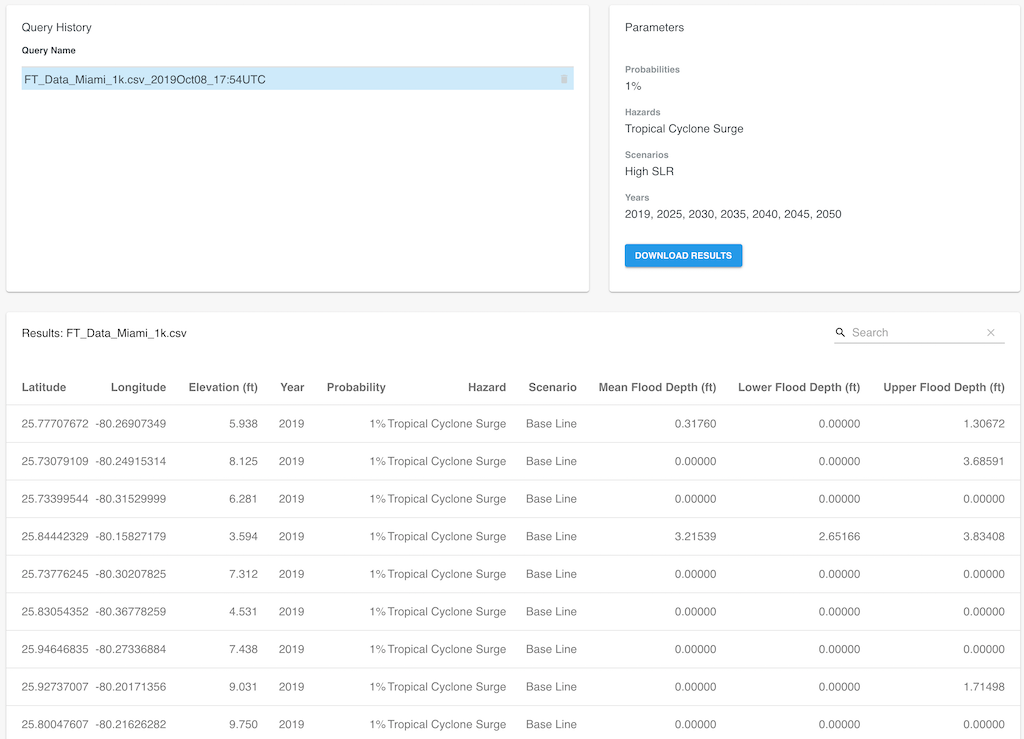
After the analysis of a given set of coordinates is complete, the results are displayed in the Results panel in the bottom half of the screen. If there are multiple queries available in the Query History panel, the Results panel shows the results of the selected query in the Query History panel. The Results panel shows the first 180 rows of data generated. For individual coordinates or a small series of locations this may be the complete set of results. Larger CSV series will need to get downloaded to get the full results. Click on the Download Results button to save a copy of the CSV file including the respective analysis data to the browser's default download folder. The generated output file name is based on internal job encoding data, for instance 4b118ba8-7a5d-4bc9-8966-285e44b5796b.csv. It can be renamed to a more meaningful file name. For detailed information about the output file format, refer to the CSV formats section.
|
|
