Getting Started
Log in to Jupiter ClimateScore |
|
|
To access the application, point your browser to the application URL: https://climatescore.jupiterintel.com On the Login Screen, enter your email address and password, and press the Login button to continue. After logging in, the ClimateScore Landing Page will open. |

|
Select the geo of interest |
|
|
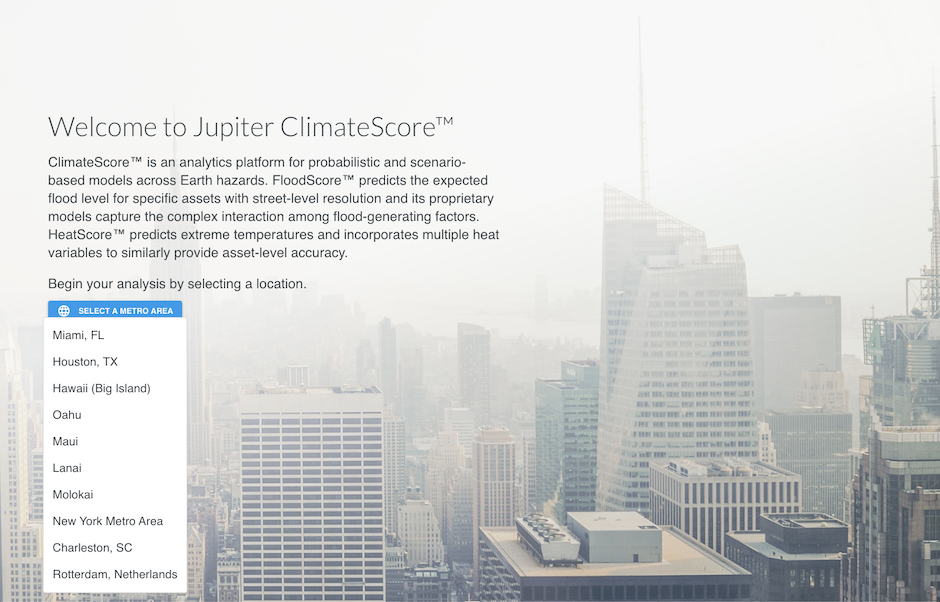
Upon logging into the application, the landing page welcomes the user to Jupiter ClimateScore, the platform that powers all of Jupiter’s analytics. Workflows in ClimateScore are geo-centric. All peril analyses start with first selecting the geographical area of interest, or geo. Find the geo selector on the left-hand side - the blue button labeled "Select a Metro Area". Click on the geo selector and select the desired geo from the dropdown list to begin a peril analysis.
|
|
ClimateScore Home Screen |
|
|
The ClimateScore Home Screen provides easy access to all available peril analyses for the chosen geo. In ClimateScore Planning 1.5 we currently offer: Note: FireScore, DroughtScore and HailScore applications will become available in future versions of ClimateScore Planning. Starting a Peril AnalysisYou can begin a peril analysis in one of two ways: Either click on the application card in the main body of the Home Screen window, or by selecting the respective application icon from the main menu on the left. Click on the |

|
|
| |
 icon to expand the main menu.